
Download MicVoice AI – Advanced AI Voice Generator, Text‑to‑Speech, Free Online Tool
MicVoice.AI is a web‑based AI voice generator that transforms any written text into lifelike speech. Powered by cutting‑edge artificial intelligence, the platform delivers natural‑sounding audio in dozens of languages, dialects, and voice styles. Whether you need a professional‑grade voice‑over for a YouTube video, an engaging narrator for e‑learning modules, or an audiobook‑ready narration, MicVoice.AI provides a fast, secure, and user‑friendly solution.
The tool’s intuitive interface requires no programming knowledge, making it accessible to students, marketers, educators, and seasoned developers alike. With high‑precision emotional rendering, the generated speech captures subtle inflections, ensuring your audience receives the intended tone and impact. MicVoice.AI stands out from traditional text‑to‑speech services by offering granular customization, real‑time preview, and seamless integration with popular content‑creation workflows.
Core Features & Compatibility
- Multi‑language support – over 30 languages and 120+ voice variants.
- Emotion‑aware synthesis – adjusts pitch, speed, and intonation to match the sentiment of the source text.
- Custom voice cloning – upload a short sample and create a brand‑specific voice model.
- Real‑time preview – instantly listen to changes without waiting for full rendering.
- Batch processing – convert entire documents or CSV files with a single click.
- Export options – MP3, WAV, OGG, and direct download links with adjustable bitrate.
- API access – RESTful endpoints for developers to integrate voice generation into apps.
- Secure cloud storage – encrypted files stay on the platform for up to 30 days.
- Collaboration tools – share projects with team members and set role‑based permissions.
- Regular updates – monthly model improvements and new voice releases.
MicVoice.AI is a fully web‑based solution, meaning it works on any modern browser across Windows, macOS, Linux, Android, and iOS devices. No additional downloads or installations are required, and the platform automatically adapts to the user’s screen size for optimal mobile and desktop experiences.
Installation, Setup & Everyday Use
Getting started with MicVoice.AI is deliberately straightforward. Follow these steps for a smooth onboarding experience:
- Visit the official website. Navigate to micvoice.ai and click the “Sign Up” button. Registration is free and only requires an email address.
- Verify your account. A confirmation email will arrive within minutes; click the link to activate your profile.
- Choose a plan. MicVoice.AI offers a free tier with limited monthly characters and a premium subscription for unlimited access, higher‑quality audio, and priority processing.
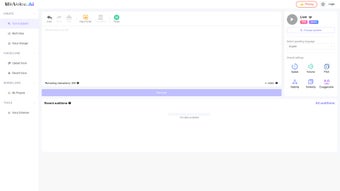
- Create a new project. Once logged in, hit “New Project,” give it a descriptive name, and select the desired language and voice style.
- Enter or paste your text. The editor supports rich‑text formatting, markdown, and CSV import for batch jobs.
- Adjust settings. Use the sliders to fine‑tune speed, pitch, and emotional intensity. For advanced users, the “Custom Voice” tab allows you to upload a short voice sample and generate a unique model.
- Preview & edit. Click “Listen” to hear a real‑time preview. If the tone needs tweaking, modify the text or settings and preview again.
- Render & download. When satisfied, press “Generate.” The platform processes the request in the cloud and presents a download button with options for MP3, WAV, or OGG. Files can also be saved directly to cloud storage or shared via a secure link.
- Integrate via API. For developers, navigate to the “API” tab, generate an API key, and follow the documentation to embed voice synthesis into your own applications.
Best practices include breaking long scripts into logical sections to reduce processing time, using plain language for higher accuracy, and testing different voice profiles to find the best match for your brand voice. MicVoice.AI also provides a “History” panel where you can revisit past projects, reuse settings, or re‑download files without re‑processing.
Pros, Cons & Frequently Asked Questions
Pros
- Highly natural, emotion‑aware speech output.
- Broad language and dialect coverage.
- No installation—runs entirely in the browser.
- Free tier available for low‑volume users.
- Robust API for seamless integration.
- Secure, encrypted cloud storage.
- Regular updates keep the AI models state‑of‑the‑art.
Cons
- Free tier limits the number of characters per month.
- High‑quality premium voices require a subscription.
- Batch processing can be slower during peak usage.
- Custom voice cloning needs a minimum of 30 seconds of clear audio.
- Internet connection is required; offline use is not supported.
Frequently Asked Questions
Is MicVoice.AI really free to use?
Yes, MicVoice.AI offers a free tier that includes up to 5,000 characters per month and access to a selection of standard voices. For larger projects or premium voice packs, you can upgrade to a paid subscription.
Can I use MicVoice.AI for commercial projects?
Absolutely. The premium plans include commercial‑use licensing, allowing you to embed generated audio in videos, advertisements, e‑learning courses, and more without additional royalties.
What file formats does MicVoice.AI support?
You can download audio as MP3, WAV, or OGG. The platform also lets you set bitrate and sample rate to match your specific publishing requirements.
How secure is my data on MicVoice.AI?
All files are encrypted in transit (HTTPS) and at rest. Files are automatically deleted after 30 days unless you choose to store them longer in a paid workspace.
Does MicVoice.AI offer an API for developers?
Yes, a fully documented REST API is available. You can generate an API key from your dashboard, set request limits, and integrate voice synthesis into web apps, mobile apps, or backend services.
Conclusion & Call to Action
MicVoice.AI positions itself as one of the most versatile and accessible AI voice generators on the market today. Its combination of high‑fidelity, emotion‑aware speech, extensive language library, and a completely browser‑based workflow makes it a compelling choice for creators, educators, and businesses seeking to add professional audio without the overhead of traditional studio recording. While the free tier is generous enough for occasional use, power users will benefit from the premium subscription’s unlimited characters, premium voice packs, and priority processing. If you’re looking to streamline your content production, improve accessibility, or simply experiment with AI‑driven narration, MicVoice.AI offers a secure, constantly updated platform that delivers on its promises.
Ready to transform your text into captivating speech? Download MicVoice AI now, create your first project for free, and experience the future of text‑to‑speech technology today.
Pros: Natural sound, multilingual, API, free tier.
Cons: Premium cost for high‑end voices, internet required.



.png)



